
Skip to contentStashiro 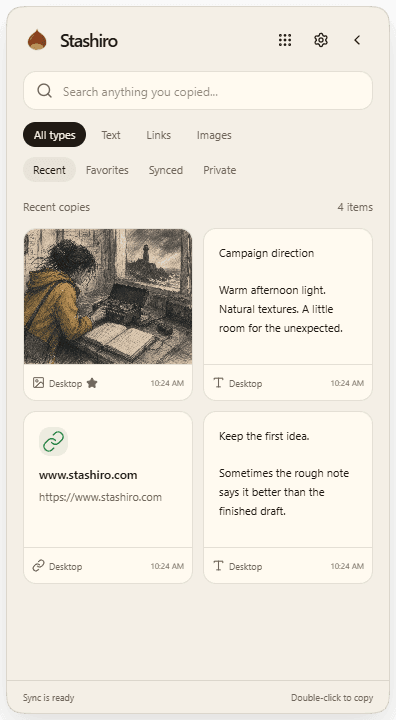
 Explore Citrus tonic campaign

Desktop clipboard manager
Your clipboard, with somewhere to go.
Find copied text, links and images with Stashiro for Windows and Mac. Sync a selected copy across devices or send it to a visual board.
Get the desktop appCmd+C. Ctrl+C. Then keep it.
Stashiro for Windows and Apple Silicon Macs keeps copied text, links and images in a desktop clipboard history. Find favorites, sync a selected copy across devices or send it to a board.
Cloud storage, collaboration, desktop access, the Chrome extension, Telegram and connected AI tools require a paid Stashiro account.
How it works
Install and sign in
Open Desktop app in your Stashiro account and choose the Windows or Apple Silicon Mac download for your computer. Sign in with your paid Stashiro account. The desktop app is available in beta.
Copy as usual
Use Cmd+C on Mac or Ctrl+C on Windows. Open the clipboard widget to find captured text, links and images. Search your history or keep a useful copy in favorites.
Choose what travels
Select the copied item and use Sync online. Sign in to the same Stashiro account on your other supported device to access the synced copy. For example, sync a copied reference image from one computer and retrieve it on the other.
Put the copy to work
Send a useful item to a board, where you can arrange it beside notes, links and other references. Your project keeps the context that a clipboard entry alone cannot.
See it in a real board
Develop a creative direction with a campaign brief, visual references, copy ideas and feedback on one board.
Explore Citrus tonic campaignBefore you start
Which desktop systems are supported?
Windows 64-bit PCs and Macs with Apple Silicon. An Intel Mac installer is not currently available. Your account's download page lists the available build for each platform. There is no native Linux desktop download.
Does the entire clipboard sync?
Sync is a deliberate action on a selected copy. Your entire clipboard history is not automatically uploaded.
Do I need a subscription?
Cloud storage, collaboration, desktop access, the Chrome extension, Telegram and connected AI tools require a paid Stashiro account.