
Skip to contentStashiro
Work through a ChatGPT reference workflow 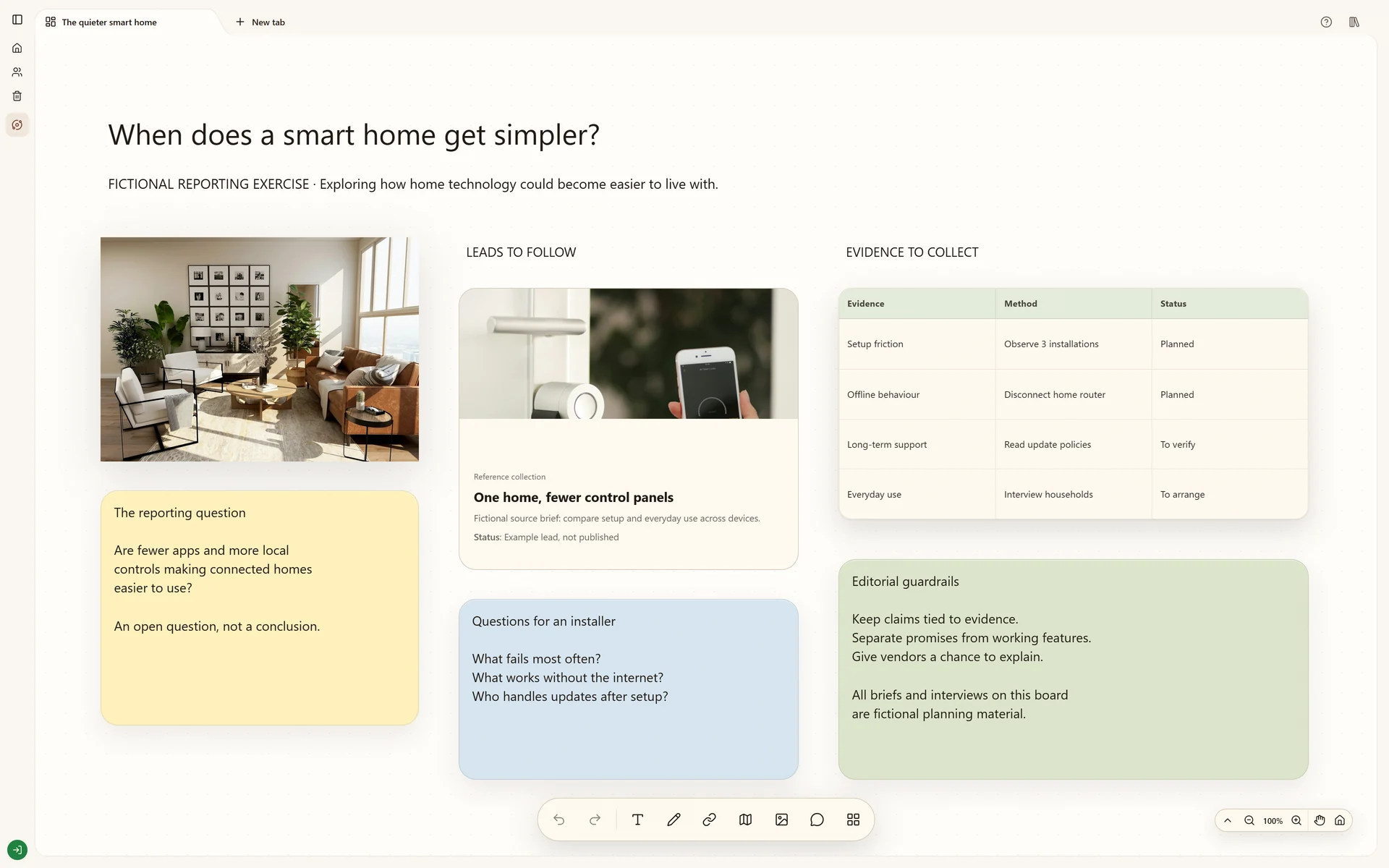 Explore How the smart home is changing

Connected tools
Connect Claude and other AI clients to your boards.
Connect compatible AI clients to Stashiro through remote MCP. Find references, create and edit visual boards, and save selected results with approved permissions.
Connect your AI chatFrom a saved thought to a useful board.
Connect a compatible AI chat to find saved references, create and edit boards, and save selected conversation results as Stashiro cards.
Cloud storage, collaboration, desktop access, the Chrome extension, Telegram and connected AI tools require a paid Stashiro account.
How it works
Open your connection settings
Sign in to Stashiro and open AI connections, then Other AI tools, in your account. MCP is the connection your assistant uses to work with Stashiro. The settings page provides the server address and instructions; you do not need to write code.
Connect a compatible assistant
In a client that supports remote MCP with OAuth, add Stashiro using the address from your account. Complete Stashiro sign-in in your browser and review the requested permissions. Install Stashiro from the ChatGPT store for ChatGPT. Claude and other clients have their own connection settings and availability requirements.
Start with a specific request
Enable Stashiro in the conversation, then ask: Find the references on my Coffee brand board. Or select a result you want to keep and ask: Save this summary and these links as cards on my Coffee brand board.
Keep working on the board
With editing permission, ask the assistant to create or change board content. Check the destination and proposed action when prompted. Open the resulting board in Stashiro to arrange cards and share your work.
What a connected assistant can do
Reading uses read access. Any change uses write access, and your AI client may ask you to approve it first.
| Task | Supported actions | Access |
|---|---|---|
| Find and read | Browse Spaces and boards, search saved content, and read a board's cards with their links, notes and images. | Read |
| Add to a board | Create notes, link cards, uploaded images, tables, charts and maps, and connect two cards. | Write |
| Edit cards | Change a card's text, move it to another board, reorder cards or delete a card you name. | Write |
| Organize boards and Spaces | Create, rename, move and pin boards, send a board to Trash or restore it, and create or rename a Space. | Write |
Requests you can try on your cloud boards
These example requests show the supported workflow, not a transcript or a guaranteed response. Replace the board names and selected content with your own.
Retrieve saved references
Find my Product research board and list its source links and notes. Do not change the board.
The assistant locates accessible cloud content and retrieves the board's supported cards. No editing permission is needed for this read request.
Check the board name and returned source URLs before asking for a synthesis. A link card is not proof that the assistant has read the entire linked website.
Save a selected answer
Save this selected summary as a note on my Product research board and add these source URLs as link cards. Leave existing cards unchanged.
With write permission, the assistant creates the specified supported cards in the chosen cloud board. Specify the exact text and URLs, then review any required approval.
Open the returned board and verify the new note and link destinations. Keep the summary beside its evidence and remove unsupported claims before using it.
Create a separate working board
Create a board called Packaging shortlist in my Brand research Space. Add these three source links and a note with the brief below. Keep the original boards unchanged.
With the required access, the assistant creates a board and the supported cards you specify. Ask it to confirm the Space if the destination is ambiguous.
Check the new board, its Space and its contents in Stashiro. Arrange the references on the canvas and add comments when reviewing with collaborators.
If the connection does not work
The app or connection is unavailable
Check the published listing for ChatGPT and your provider's account or workspace requirements. For a custom connection, use the remote MCP address from AI connections, then Other AI tools, in your Stashiro account.
The assistant cannot find a board
Check that you connected the correct Stashiro account and that the board is in the cloud with access granted to that account. Local guest boards stay in their browser until you explicitly transfer them.
A write action is refused
Review the connection permissions and the board role. Reading content and editing it require different access. Reconnect with the needed permissions only if you intend to allow the change.
Disconnect an assistant
Open Manage connected chats in your Stashiro account to revoke access. Retrieved material is shared with the connected AI service, so choose which project content to use before making a request.
Looking for the Stashiro app in ChatGPT?
Stashiro is available in the ChatGPT app directory. Start with the published app rather than this custom MCP setup guide.
Use Stashiro in ChatGPTConnection details
The remote MCP server address is https://www.stashiro.com/api/mcp. It uses OAuth, so you sign in to Stashiro in your browser and paste no key. In Claude, add Stashiro as a custom connector with this address. Other clients name the setting differently. Your account's AI connections page has the same address and the controls to revoke access. Your AI provider decides which plans and workspaces allow custom connections and editing actions.
See it in a real board
Explore a fictional technology reporting workflow with sources, questions and connected research about the smart-home sector.
Explore How the smart home is changingBefore you start
Can I use it with any ChatGPT account?
Availability and allowed actions depend on your ChatGPT account and workspace settings. Check the Stashiro listing in ChatGPT for current access requirements. A paid Stashiro account is required for connected cloud boards.
Can it read all my chats or local boards?
Your connection follows your account access and the permissions you approve. Retrieved content is shared with the AI service you connect. Local browser boards and unselected chat history are not automatically imported.
What can an editing connection change?
Within granted access, it can create, edit or delete supported content. Choose the permissions that fit your task. You can revoke access through Manage connected chats in your Stashiro account.
What do I need?
A paid Stashiro account, cloud boards and a compatible AI client that supports the required connection and actions. The AI provider may have separate plan or workspace requirements.