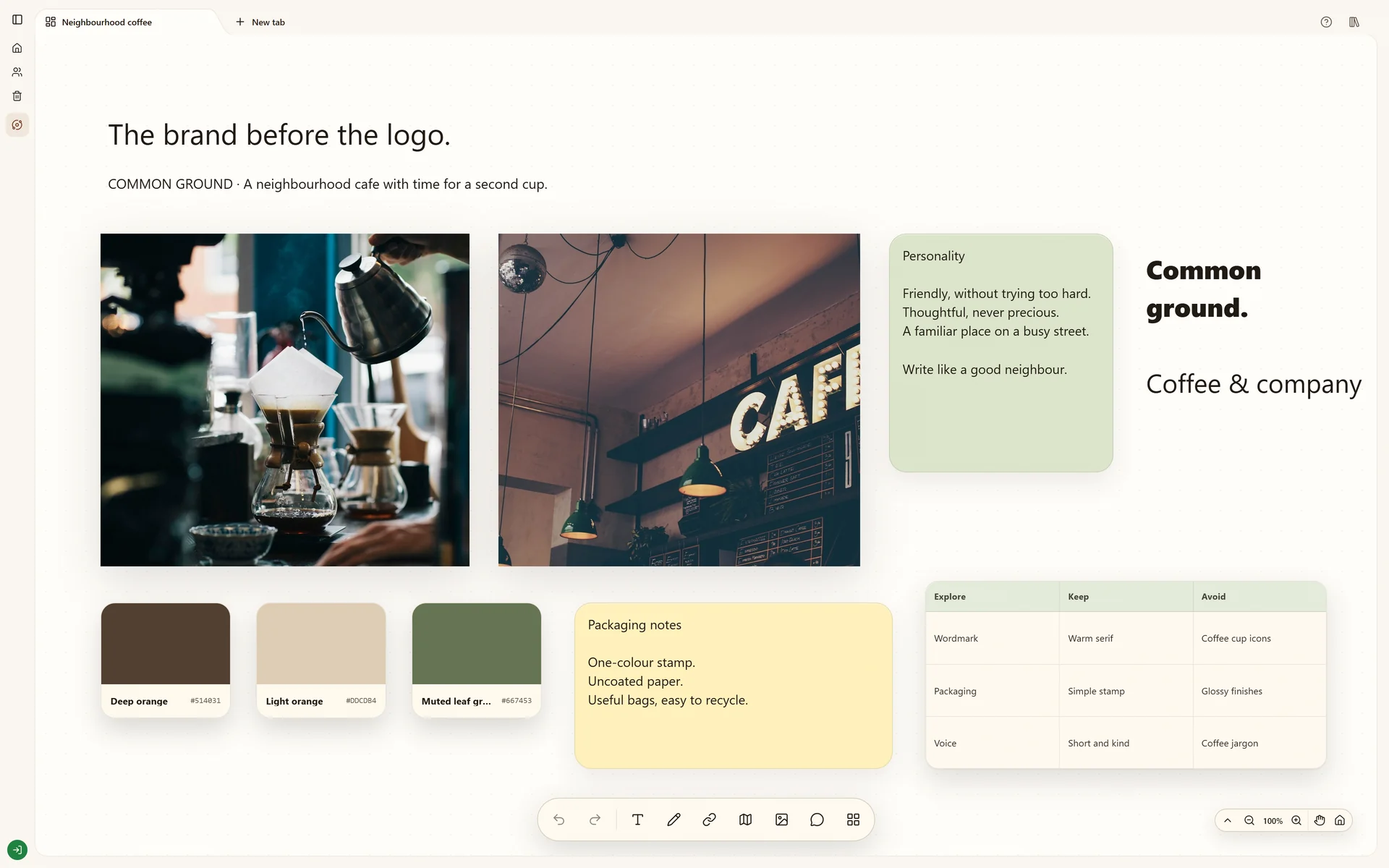
A moodboard maker for a direction you can explain.
Make an online moodboard with images, source links and notes. Compare creative directions on a Stashiro canvas and review a shared cloud board with your team.
A moodboard collects the visual references that explain how a project should look and feel. Stashiro gives those references a canvas: place an image beside its source, describe what matters and group the references into a direction. Use it for a brand, a campaign or a photoshoot before making the final assets.
Write who the project is for and the feeling it should communicate. Collect images for color, lettering, materials or photography. Keep the original links and add a note about what each reference contributes. A useful moodboard makes the choices understandable without needing the person who collected them to explain every image.
Compare directions on the same canvas
Arrange cards freely, resize your images and use text labels for distinct directions. A warm, tactile coffee brand and a bright, playful one can sit side by side while you compare them against the same brief. Draw a connection when one reference explains a particular choice. Related boards can live in the same Space.
Review the board together
On a paid cloud board, invite someone to view, add sources or edit according to their role. Use comments beside the references to discuss what fits the brief. Keep the selected direction separate from the wider collection so the production team knows which material to follow.
Collect from your browser and desktop
Paste links and add your own images in the browser. The paid Chrome extension saves references to a chosen board's queue, ready to place. The Windows and Apple Silicon Mac desktop app can send a useful copied item to a board. These are deliberate saves; Stashiro does not turn your entire browsing or clipboard history into a moodboard.
Work through a project
Build a brand moodboard with a clear brief, source links and a small set of visual directions. Use a Stashiro board to explain why each reference belongs.
Can I try this moodboard maker without an account?
Yes. Local boards work in your browser without signing in. Cloud storage, sharing and connected tools require a paid Stashiro account. A local board stays in this browser until you explicitly transfer it.
Is a moodboard the same as a reference board?
A moodboard communicates a visual direction. A reference board can hold a wider collection of sources, options and observations. Keep the broad research on one board and the selected direction on a sibling board when that distinction helps your project.
Can I start with a template?
The Coffee brand example includes a downloadable starter board with editable prompts. Import it from the Spaces sidebar, then replace the prompts with your own brief and references. The starter is not a copy of the illustrated project.
Can I use the reference images in my final design?
Saving a reference does not grant permission to reuse it. Keep the source and check licensing before an image becomes part of a published asset. Stashiro organizes the direction; it does not replace your design or image editing tools.
Try local boards without an account. They stay in this browser until you explicitly transfer them to your cloud account. Cloud storage, collaboration, desktop access, the Chrome extension, Telegram and connected AI tools require a paid Stashiro account.