Trips
Itineraries with maps and routes
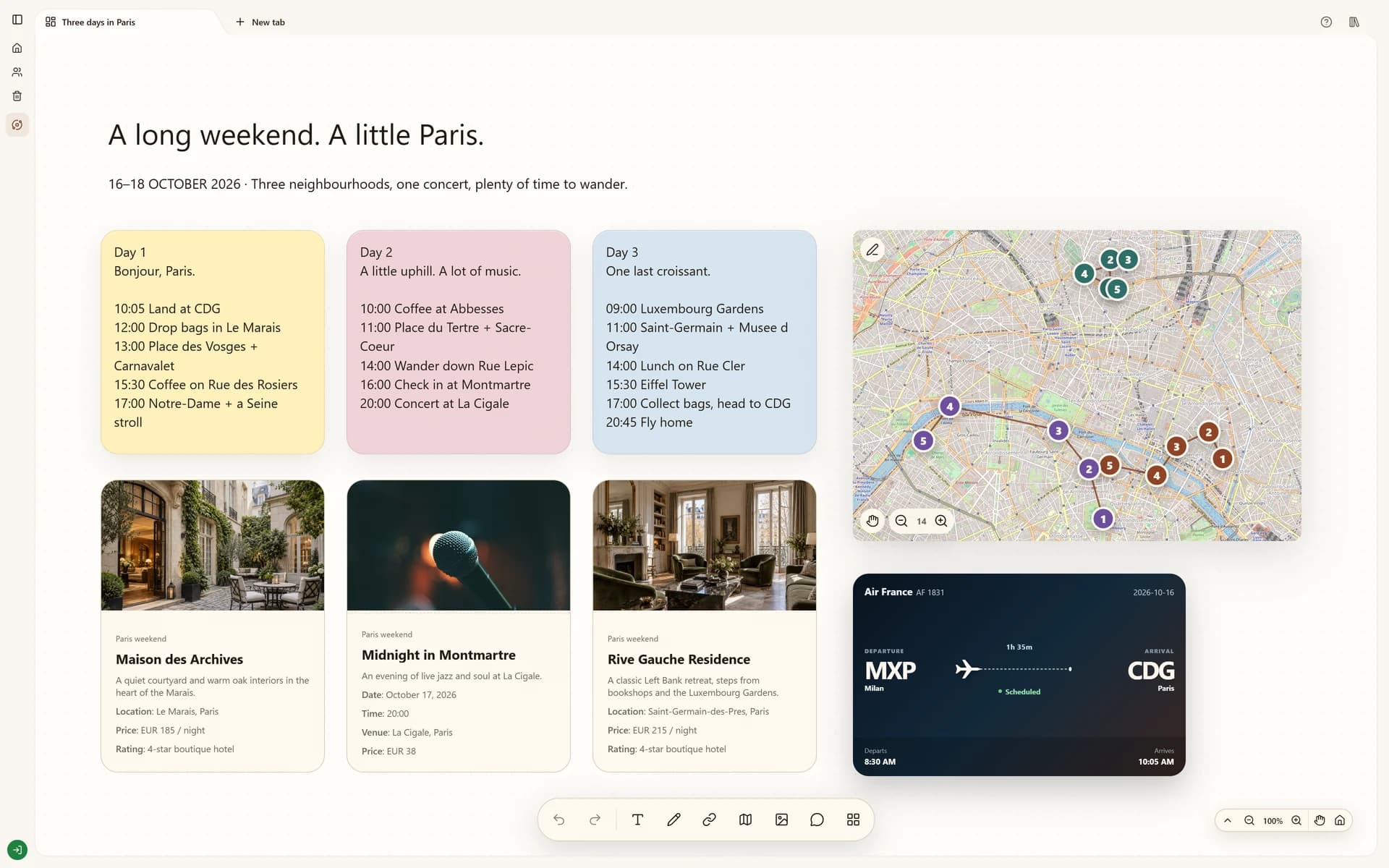
Map cards show each stop and the routes between them. Hotel pages from Trip.com and flight cards sit beside the day they belong to.
See trip planningUse case for everyday plans
Compare places, products and ideas side by side, then decide together. A Stashiro board keeps the hotel links, the flat listings, the sofa options and the notes about each one in one view, so a plan is never split across tabs, chats and screenshots.
A visual planner is a board where the options for a real decision sit side by side: places on a map, products with their pictures and prices, and notes about what matters. Stashiro is a visual board for that: an infinite canvas of links, images, notes, maps and tables, grouped into Spaces and shared with the people deciding with you.
It does not book, buy or track prices for you. It is the place where you collect the options, compare them honestly and keep the reason for the final choice.
Make one Space for the trip, the move or the purchase, with sibling boards for ideas, options and the final shortlist.
Paste hotel, product and listing links, or send them from your phone through the Telegram bot. Supported links show their picture and title on the card.
Group options in rows, put the prices in a table and write one note per option about what you liked and what worries you.
Invite your partner or friends to view, add sources or edit. Comments stay next to the option they are about.
Trips
Map cards show each stop and the routes between them. Hotel pages from Trip.com and flight cards sit beside the day they belong to.
See trip planningHomes
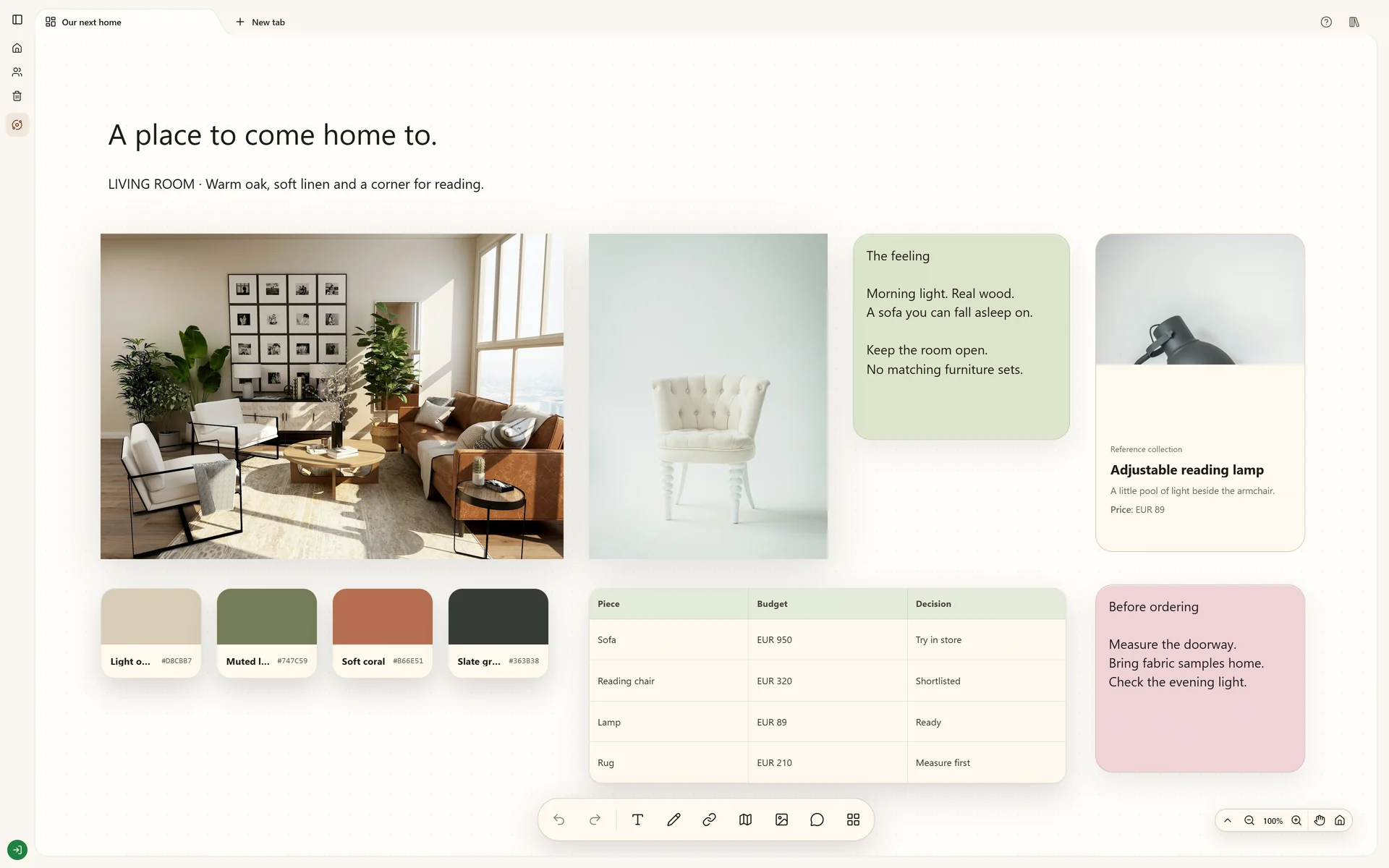
Room references, product links and a budget table on one board, so a beautiful picture never hides the price.
See home projects for couplesShopping
Amazon, AliExpress and Temu links become product cards with the main product image. Other shops keep a link preview.
See shopping shortlistsTogether
Invite people to a cloud board as viewers, contributors who add sources, or editors, and talk it through in comments. Everyone who adds or edits needs their own paid plan.
See the home exampleSaved for later
Stashiro tells you when you save a link you already have and can check a board for broken links.
See collecting and bookmarkingChecklists
Add to-dos and tickets with an owner and a due date, and move them across a kanban beside the plan.
See trip planningPlan on a local board for free, with no account. Move to the cloud when you want to plan together.
Free
No account. Boards stay in this browser until you transfer them.
4.79 EUR per month
Cloud boards without built-in AI.
8.99 EUR per month
Cloud boards with Stashiro AI.
10.99 EUR per month
Plus with more storage and AI credits.
Eligible new subscribers get a 14-day trial. Prices are shown in EUR; current prices, regional currencies and annual plans are on the pricing section.
Worked examples show the real Stashiro interface with fictional project data, and some include a starter board you can download and import. Templates open as a new board you can edit.
Day notes, a route map, hotel options, flights and a concert ticket.
Home references, priorities and options to compare together.
Days, stops, bookings and a packing list.
Rooms, products, quotes and the order of the work.
Pinterest is unbeatable for discovering ideas, Notion builds any database you want, and Trello is a simple shared checklist with phone apps. Here is where each one stands for everyday plans, including where Stashiro is not the best pick.
| Need | Stashiro | Notion | Trello | |
|---|---|---|---|---|
| Free-form canvas for images, links and notes | Yes | Partly | No | No |
| Map cards with stops and routes | Yes | No | Partly | Partly |
| Start a board without an accountLocal boards open in the browser and stay there until you transfer them. | Yes | No | No | No |
| Save web pages with a browser extensionChrome and Edge, on paid plans. | Yes | Yes | Yes | Yes |
| Discover ideas from other people | No | Yes | No | No |
| Native phone apps in the app storesStashiro runs in the phone browser, and the Telegram bot sends links, photos and voice notes to a board. | No | Yes | Yes | Yes |
| Free cloud planFree boards stay in your browser. Cloud boards start at the Starter plan. | No | Yes | Yes | Yes |
| Tasks with an assignee and a due dateTo-do, ticket and kanban cards on the board. | Yes | No | Yes | Yes |
Verdicts for other tools come from their official product, pricing and help pages. No means those pages do not describe the feature, not that we tested it. Each full comparison lists its sources.
Local boards are free and need no account: they stay in your browser. Cloud boards, sharing and the extension need a paid plan, from 4.79 EUR per month for Starter. Stashiro AI is included on Plus and Studio.
Yes, on a cloud board. Invite them to view, add sources or edit, and leave comments next to each option. A local board stays in one browser and is not shared.
No. Stashiro collects and compares options. You book and buy on the original site, which the card links to.
No. Prices you write in a table or a note stay as you typed them. Product previews show the current picture and title when the board loads, but Stashiro does not watch prices.
There is no app in the phone stores. Stashiro runs in your phone's browser, and the Telegram bot sends links, photos and voice notes to a board.
No. A link card shows a preview of the page when the board loads; it is not a copy of the page. If a listing is removed, keep the details that matter in a note.
Yes. Each Space holds one plan, and its sibling boards separate ideas, options and the shortlist.
Yes. Share a view-only link that opens without an account.
Open a local board in your browser now, or start a 14-day trial when you want to plan together.