No rigid grid
Moodboards you arrange yourself
Images, links and notes go anywhere on the canvas and resize freely. Group them in rows, columns, grids or folders when you want order.
See the moodboard makerUse case for designers
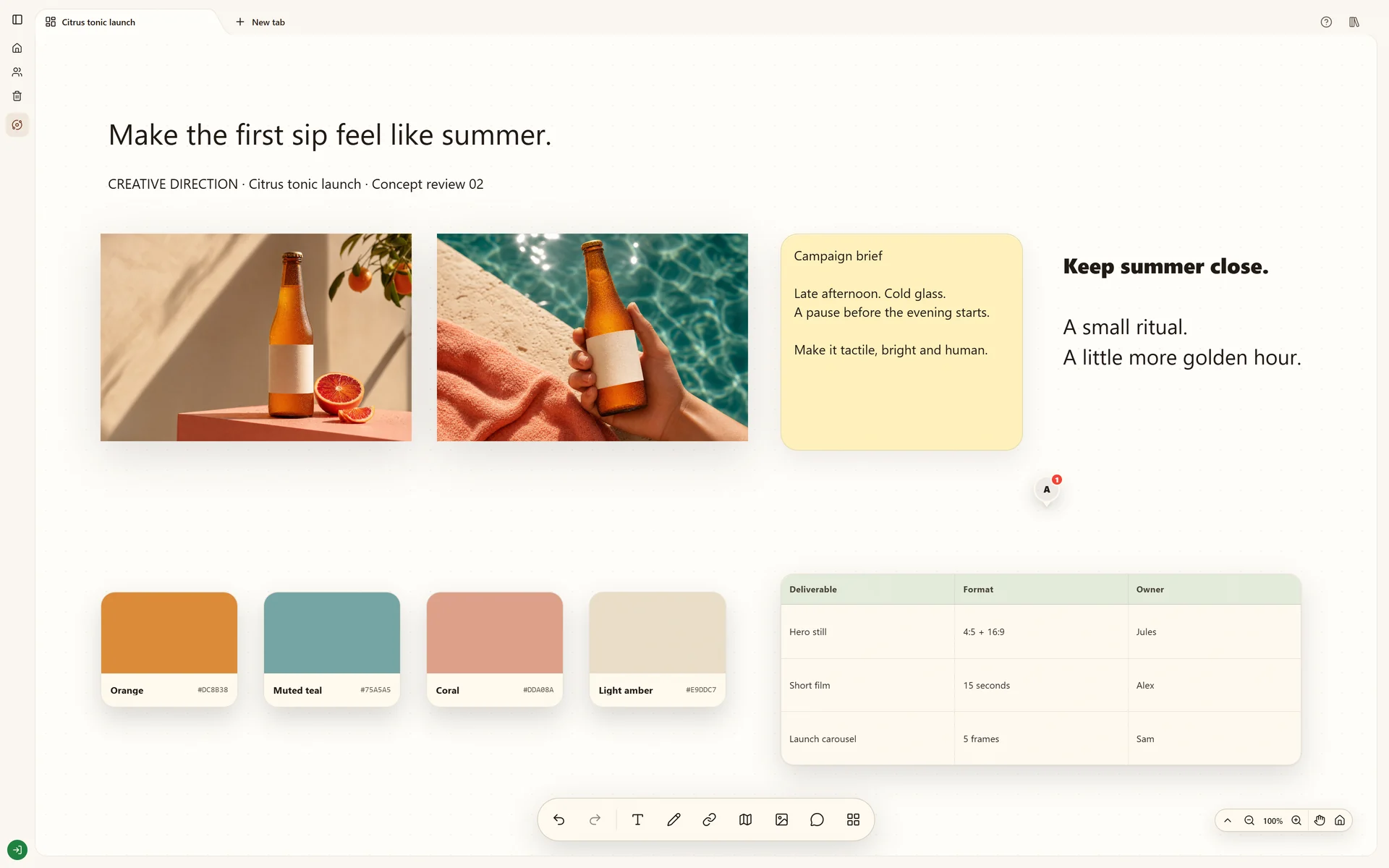
Brand, product and visual designers collect references, write the brief and record decisions on one Stashiro canvas. There is no fixed grid: place, resize and group references until the direction explains itself, then hand off to your design tool.
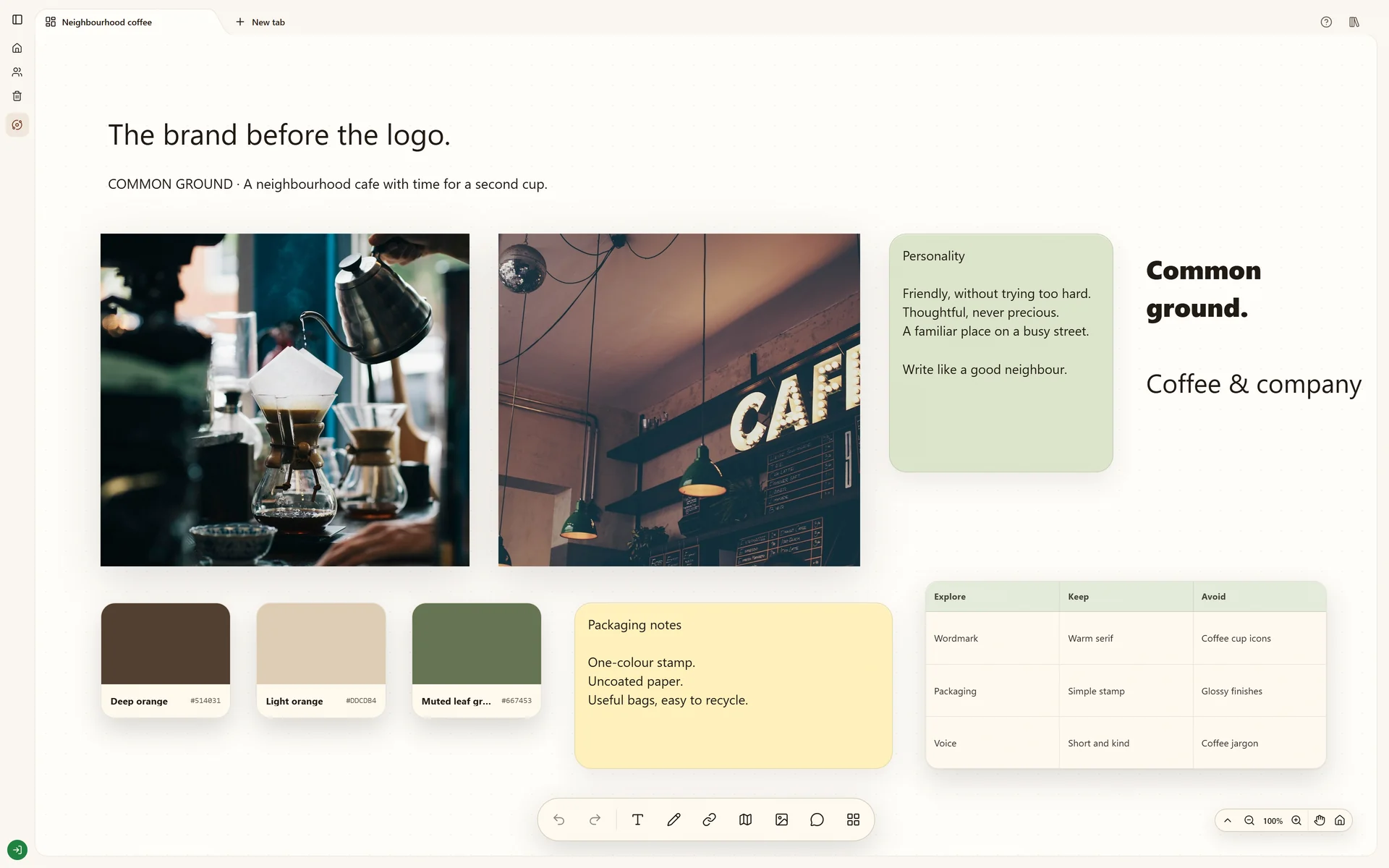
A design moodboard and brief board is one place where the references for a project, the brief they answer and the decisions taken from them live together before design starts. Stashiro is a visual board for that work: an infinite canvas where images, links, notes, color swatches and connectors sit wherever you place them, grouped into Spaces per client.
The final design happens in Figma, Adobe tools or whatever you design in. The board is the thinking layer around the design file: why it looks the way it does.
Open a Space for the client. Put the audience, the problem and the feeling the work should leave in a note at the top of the board.
Save pins, posts, products and pages, then place and resize them freely. Group references by what they decide: color, type, imagery, layout.
Add color swatches and do and avoid notes under each group. Connect a decision to the reference it came from with an arrow.
Invite the client to review the board. When the direction is agreed, keep it on its own board and design from it in your tool.
No rigid grid
Images, links and notes go anywhere on the canvas and resize freely. Group them in rows, columns, grids or folders when you want order.
See the moodboard makerSave from anywhere
Paste a Pinterest, Instagram or shopping link and the board shows its preview. The Chrome extension and the desktop clipboard app send references from wherever you found them.
See the visual bookmark managerFlows and sitemaps
Connectors anchor to card edges and follow cards as you move them, so a rough user flow or sitemap stays readable while you rearrange it.
See product team boardsClient reviews
Invite clients to view, add sources or edit. Feedback sits beside the image it is about instead of in an email thread.
See how agencies run client workMind maps and diagrams
Turn a concept into a mind map or a flowchart with connected cards, laid out radially or as a tree.
See team planning boardsDesign studio
Lay out a poster, a social post or a carousel from the board's images and words, then edit every layer by hand.
See campaign boardsOne Space per client. Collect on a free local board, and move to the cloud when the client reviews.
Free
No account. Boards stay in this browser until you transfer them.
4.79 EUR per month
Cloud boards without built-in AI.
8.99 EUR per month
Cloud boards with Stashiro AI.
10.99 EUR per month
Plus with more storage and AI credits.
Eligible new subscribers get a 14-day trial. Prices are shown in EUR; current prices, regional currencies and annual plans are on the pricing section.
Worked examples show the real Stashiro interface with fictional project data, and some include a starter board you can download and import. Templates open as a new board you can edit.
A brand moodboard that turns references into a direction.
Campaign territories with references and the brief.
Audience, problem, constraints and deliverables in one place.
Work in progress with feedback grouped by theme.
The direction laid out for a client walkthrough.
FigJam sits next to your Figma files and runs workshops, Milanote has templates and phone apps, and Pinterest is the best place to discover references. Here is how each one handles moodboards and briefs, including the rows Stashiro does not win.
| Need | Stashiro | FigJam | Milanote | |
|---|---|---|---|---|
| Free-form canvas for images, links and notes | Yes | Yes | Yes | Partly |
| Save web pages with a browser extensionChrome and Edge, on paid plans. | Yes | No | Yes | Yes |
| Save from a desktop clipboard historyDesktop app for Windows and Apple Silicon Macs, in beta. | Yes | No | No | No |
| Built-in AI that drafts or edits the workStashiro AI lays out and edits boards on Plus and Studio, with a preview before anything is applied. | Yes | Yes | No | Partly |
| Start a board without an accountLocal boards open in the browser and stay there until you transfer them. | Yes | No | No | No |
| Workshop tools such as timers and voting | No | Yes | No | No |
| Discover ideas from other people | No | Partly | No | Yes |
| Large template libraryAbout 80 templates in 26 categories. | Partly | Yes | Yes | No |
| Native phone apps in the app storesStashiro runs in the phone browser, and the Telegram bot sends links, photos and voice notes to a board. | No | Partly | Yes | Yes |
Verdicts for other tools come from their official product, pricing and help pages. No means those pages do not describe the feature, not that we tested it. Each full comparison lists its sources.
Local boards are free and need no account: they stay in your browser. Cloud boards, client reviews and Stashiro AI need a paid plan, from 4.79 EUR per month for Starter. AI is included on Plus and Studio.
It is not a design tool. It does not edit vectors, build prototypes or generate images. Design in Figma or your usual tool and keep the references, the brief and the decisions on the board.
There is no fixed grid. You place and resize references freely, and group them only when you want to, in rows, columns, grids or folders. The layout itself can say what matters most.
Yes. Paste a Pinterest link and the board shows the pin's preview. Saving a pin does not copy a whole Pinterest board or give you rights to reuse the image.
Yes, as an editor. Invite the client to a cloud board as an editor to comment next to the reference or group they mean, or as a viewer to look without changing anything. Viewers sign in with a free account to see the board; editors need a paid plan to add cards and comments.
Yes. Use notes or text cards for screens and pages and connect them with arrows. Connectors follow the cards as you rearrange them.
On Plus and Studio, Stashiro AI can draft a brief or lay out a first board from a prompt and the cards already on the board. You see a preview and nothing is added until you apply it.
Yes. The design studio lays out a poster, a social post or a carousel from the board's images and words. Every layer stays editable by hand. It uses your images and does not generate new ones.
Yes, when the board owner turns on comments for viewers. Their comments sit next to the card they are about, and the owner can turn the option off again.
Open a local board in your browser now, or start a 14-day trial when the client joins.