Research synthesis
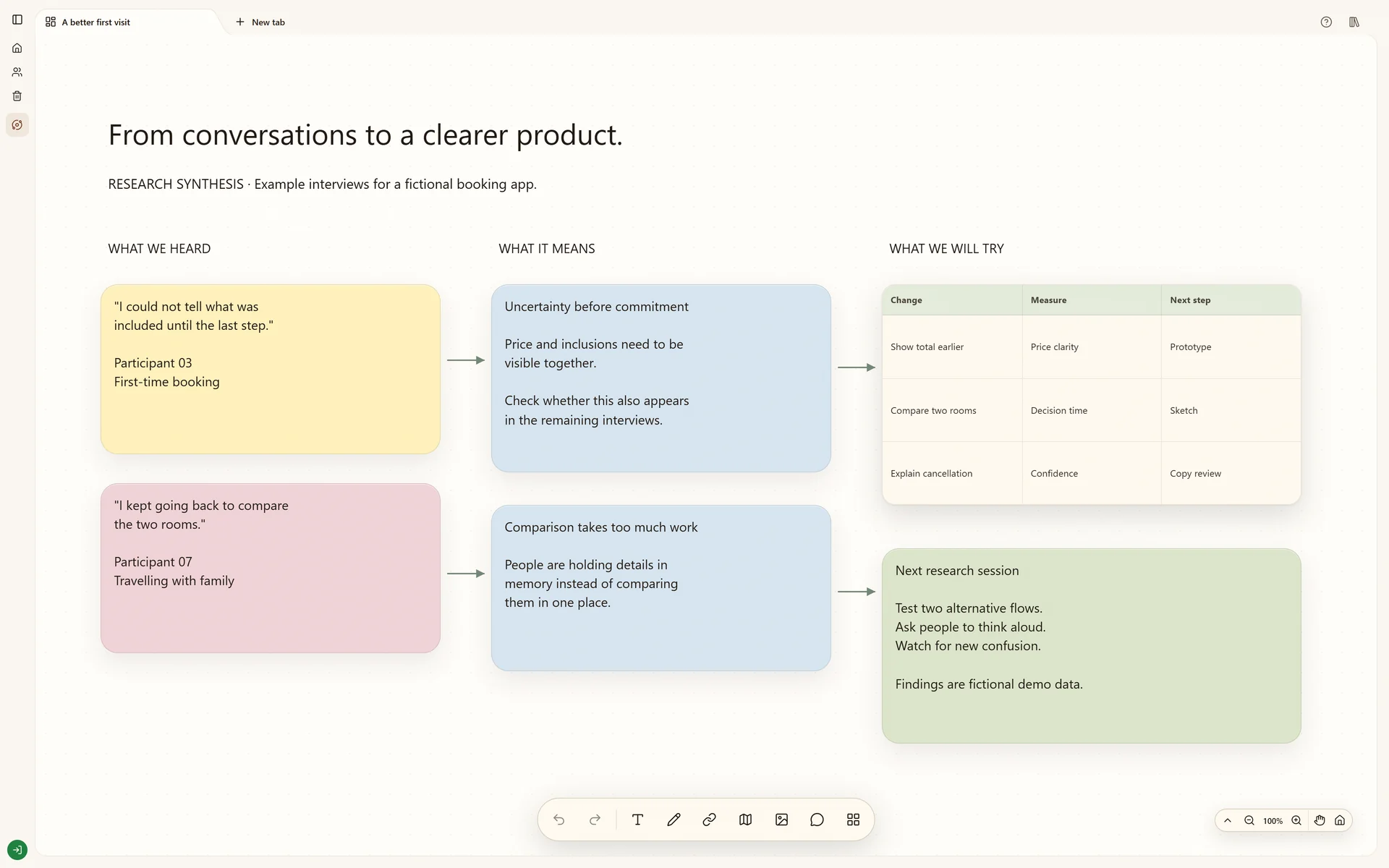
Cluster research into themes
Drag notes into containers by theme, journey stage or severity. Containers move as one block, so the clusters stay intact while you rearrange.
See the research exampleUse case for product teams
Product managers, UX designers and web teams lay out the research, the user flows, the sitemap and the open decisions on one Stashiro canvas. Screens and notes sit beside the flow step they belong to, and the evidence stays one arrow away from the decision.
A product discovery board is a shared canvas where a team keeps user research, flows, screens and open decisions together while it figures out what to build. Stashiro is a visual board for that work: notes, screenshots, links, tables and connectors on an infinite canvas, grouped into Spaces per product area.
Stashiro is not an issue tracker. Tickets, sprints and releases stay in Jira, Linear or GitHub. The board holds the reasoning that comes before the tickets, and you link to them from the cards.
Open a Space for the product area. Paste interview notes, support quotes, analytics screenshots and competitor links onto the first board.
Group cards by problem or journey stage in containers. Name each group with a short note and count the evidence behind it.
Lay out each step of the flow as a card, connect them with arrows and place the screen or sketch beside each step. Mark open questions in a different color.
Write the decision on a note linked to its evidence, add the tracker link and invite engineering and design to view or edit the board.
Research synthesis
Drag notes into containers by theme, journey stage or severity. Containers move as one block, so the clusters stay intact while you rearrange.
See the research exampleFlows and sitemaps
Draw arrows between steps and pages. Connectors stay attached when you move a card, so a flow survives a redesign of the board.
See boards for designersFindable later
Search reads card text, tags and the kept text of saved pages, so last quarter's finding is a phrase away.
Organize research linksA first draft from a prompt
On Plus and Studio, describe the feature and Stashiro AI proposes the steps and open questions as cards. Review the preview before you apply it.
See Stashiro AIDiagrams
Branch an idea into a mind map or turn a process into a flowchart with layouts that keep the shape tidy.
See boards for developersSpecs on the board
Drop a spec PDF or a research spreadsheet on the board and read it in place.
See research boardsOne Space per product area. Start on a free local board, and move to the cloud when the team joins.
Free
No account. Boards stay in this browser until you transfer them.
4.79 EUR per month
Cloud boards without built-in AI.
8.99 EUR per month
Cloud boards with Stashiro AI.
10.99 EUR per month
Plus with more storage and AI credits.
Eligible new subscribers get a 14-day trial. Prices are shown in EUR; current prices, regional currencies and annual plans are on the pricing section.
Worked examples show the real Stashiro interface with fictional project data, and some include a starter board you can download and import. Templates open as a new board you can edit.
Research notes, source material and product decisions on an evidence board.
Sources, questions and connected research on one board.
Stages, actions, feelings and opportunities for one journey.
Pages and their links, laid out as a tree.
The problem, the scope and the open questions for one feature.
FigJam sits next to your design files, Miro has more workshop tools and integrations, and Notion is better for specs and databases. None of them, Stashiro included, replaces an issue tracker. Here is where each one stands for discovery.
| Need | Stashiro | FigJam | Miro | Notion |
|---|---|---|---|---|
| Free-form canvas for images, links and notes | Yes | Yes | Yes | No |
| Built-in AI that drafts or edits the workStashiro AI lays out and edits boards on Plus and Studio, with a preview before anything is applied. | Yes | Yes | Yes | Yes |
| Works from ChatGPT or ClaudeAn app in the ChatGPT store and an MCP connection for Claude and other clients. | Yes | Yes | Yes | Yes |
| Save web pages with a browser extensionChrome and Edge, on paid plans. | Yes | No | Partly | Yes |
| Start a board without an accountLocal boards open in the browser and stay there until you transfer them. | Yes | No | No | No |
| Workshop tools such as timers and voting | No | Yes | Yes | No |
| Long documents and databasesDoc cards with a block editor, beside the board. | Partly | No | Partly | Yes |
| Tasks with an assignee and a due dateTo-do, ticket and kanban cards on the board. | Yes | No | Yes | Yes |
| Native phone apps in the app storesStashiro runs in the phone browser, and the Telegram bot sends links, photos and voice notes to a board. | No | Partly | Yes | Yes |
Verdicts for other tools come from their official product, pricing and help pages. No means those pages do not describe the feature, not that we tested it. Each full comparison lists its sources.
Local boards are free and need no account: they stay in your browser. Cloud boards, sharing with the team and Stashiro AI need a paid plan, from 4.79 EUR per month for Starter. AI is included on Plus and Studio.
No. It has no sprints, story points or release tracking. Plan and decide on the board, then carry the agreed work into Jira, Linear or GitHub and link the tickets from the cards.
No. Design in Figma or your design tool and bring screenshots or links onto the board, beside the flow step they belong to.
Put one observation per note, drag notes into containers by theme and name each container. Keep the quotes and recordings next to the theme they support.
Yes. Invite them to the cloud board as viewers, as contributors who can add sources, or as editors.
Yes. The Stashiro app in ChatGPT and the MCP connection for Claude can read a board you name and add cards to it, within the permissions you approve.
No. For a live workshop with voting and timers, Miro or FigJam are better choices. Stashiro is for keeping the research and decisions after the workshop.
Open a local board in your browser now, or start a 14-day trial when the team joins.