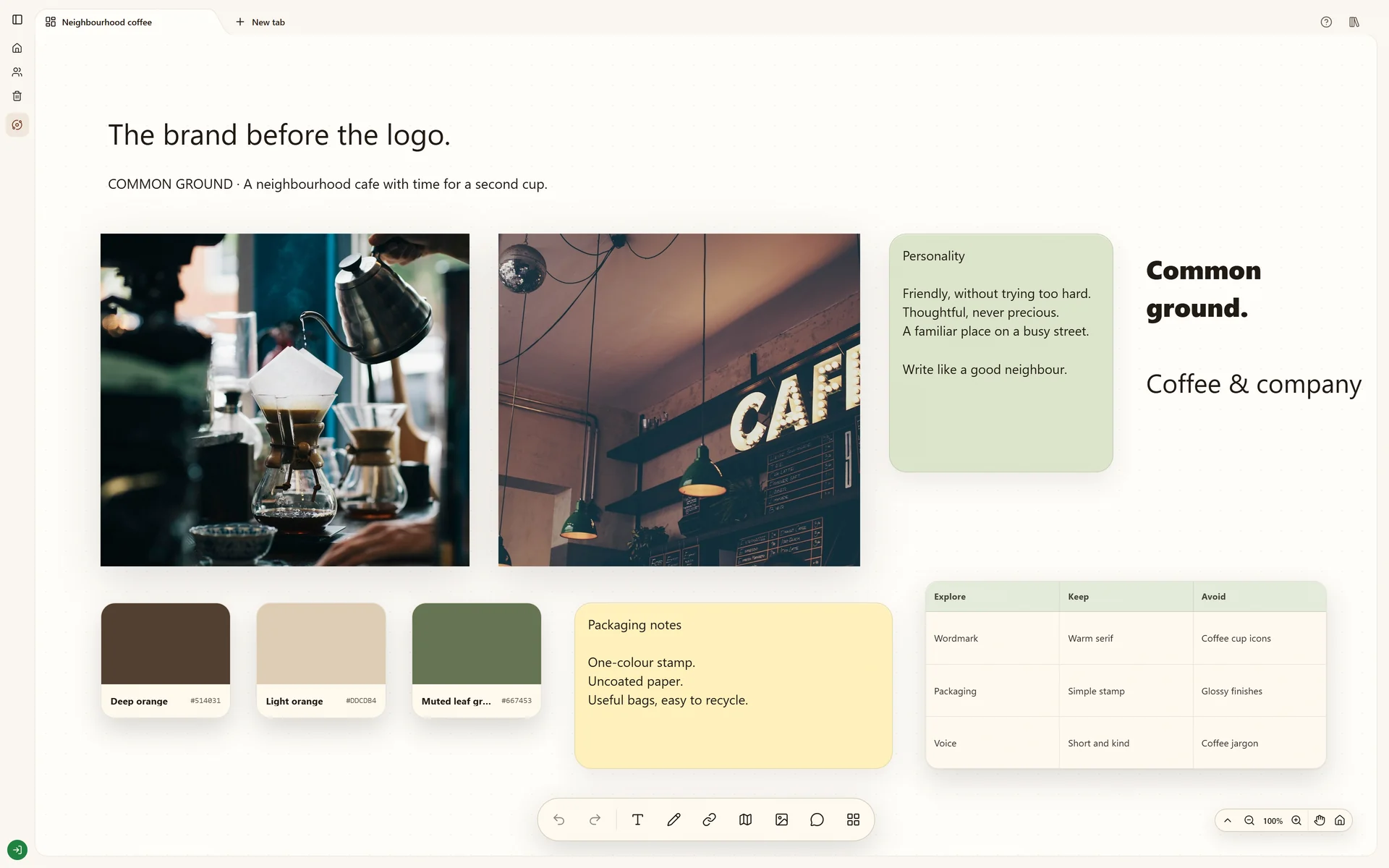
A moodboard with a reason
References grouped by what they teach
Place images freely, resize them and label each group. A note under a reference says what to take from it, so nobody guesses why it is there.
See the moodboard makerUse case for photographers
Photographers keep the moodboard, the shot list, the locations and the run of the day on one Stashiro canvas. Each setup sits beside the references that explain it, so the client, the stylist and the assistant see the same plan.
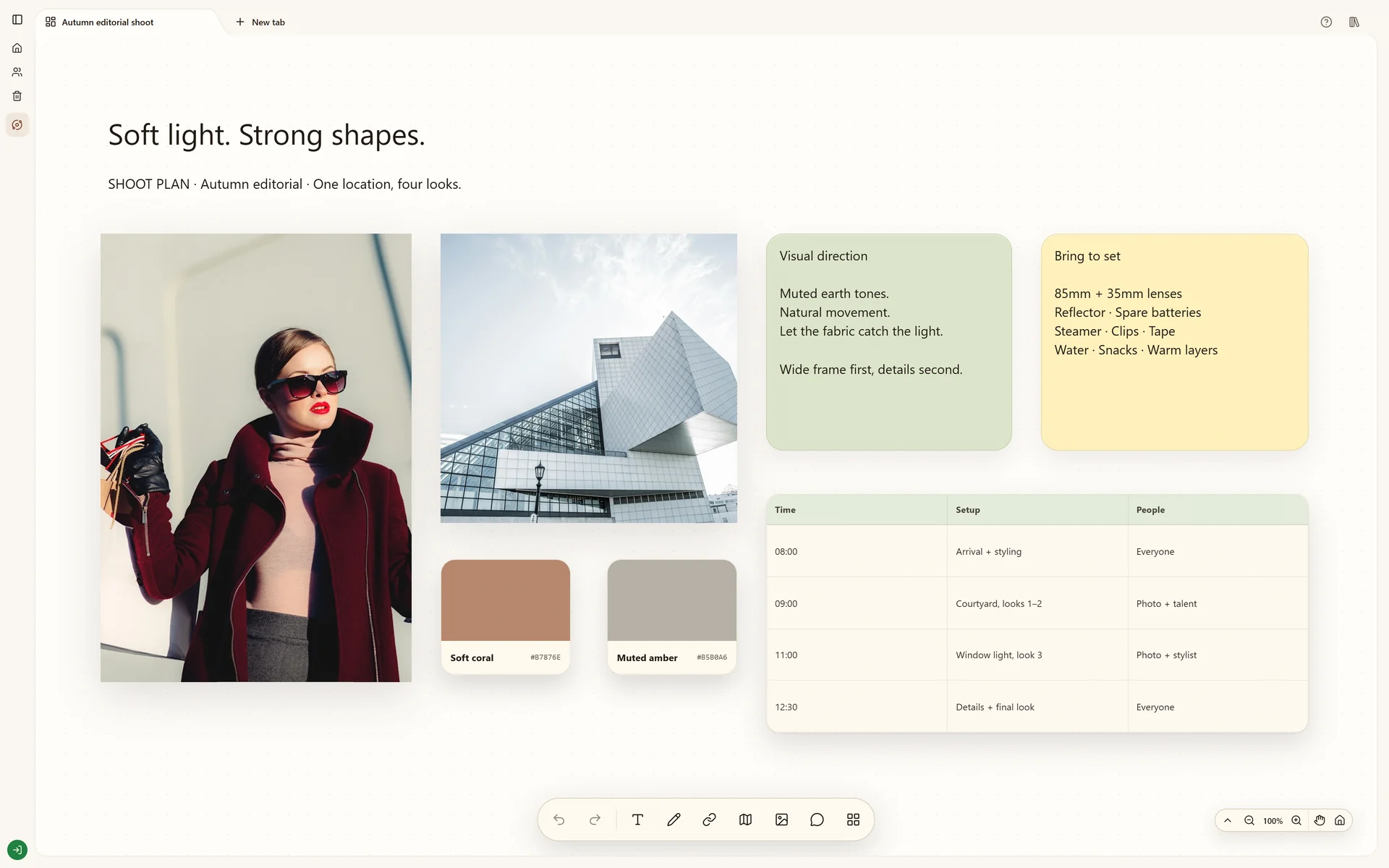
A shoot planning board is one place where the references, the shot list, the locations and the schedule of a photoshoot live together before the shoot day. Stashiro is a visual board for that work: an infinite canvas where images, links, notes, tables and maps sit side by side, grouped into Spaces per client and shared with the people on set.
Editing, retouching and delivery still happen in your photo tools. The board is where the shoot is decided: which light, which poses, which looks and in what order.
Create a Space for the client with sibling boards for the moodboard, the shot plan and the selects. Paste the brief into a note at the top.
Save references from Pinterest, Instagram and the web, then group them into light, poses, styling, hair and makeup, and location. Write one line under each group.
Put a table beside the moodboard with one row per setup: the look, the lens, the light and the must-get frames. Keep the run of the day in a column of notes.
Invite the client to view the board and the stylist to add sources. Comments stay next to the reference or setup they are about.
A moodboard with a reason
Place images freely, resize them and label each group. A note under a reference says what to take from it, so nobody guesses why it is there.
See the moodboard makerSetups in order
A table holds every setup with the look, the lens and the light. Connect a row to the reference it comes from with an arrow.
See the shoot exampleLocations and travel
Map cards show each location as a stop with routes between them. Keep the scouting photos and the permit notes next to the map.
See how trips are plannedSave from anywhere
The Chrome extension saves a page to a board's queue. The Telegram bot sends a photo or a voice note from your phone straight to a board.
See the Telegram botPrep in one place
Track wardrobe pulls, props and returns as to-dos and tickets with an owner and a due date, on the same board as the plan.
See how stylists plan looksClient review
Send the shoot plan or the selects board as a link that opens in the browser, with no sign up needed to look.
See how agencies share boardsOne Space per client. Plan on a free local board, and move to the cloud when the client needs to see it.
Free
No account. Boards stay in this browser until you transfer them.
4.79 EUR per month
Cloud boards without built-in AI.
8.99 EUR per month
Cloud boards with Stashiro AI.
10.99 EUR per month
Plus with more storage and AI credits.
Eligible new subscribers get a 14-day trial. Prices are shown in EUR; current prices, regional currencies and annual plans are on the pricing section.
Worked examples show the real Stashiro interface with fictional project data, and some include a starter board you can download and import. Templates open as a new board you can edit.
References by look, a shot table and the run of the day.
A brand moodboard that turns references into a direction.
Brief, references, setups and the schedule for one shoot.
References grouped by light, pose and styling.
Every setup with the look, lens and must-get frames.
Pinterest is the best place to discover references, Milanote has phone apps and a free plan, and Notion is stronger for long documents. Here is how each one handles planning a shoot, including where Stashiro falls short.
| Need | Stashiro | Milanote | Notion | |
|---|---|---|---|---|
| Free-form canvas for images, links and notes | Yes | Yes | Partly | No |
| Save web pages with a browser extensionChrome and Edge, on paid plans. | Yes | Yes | Yes | Yes |
| Map cards with stops and routes | Yes | No | No | Partly |
| Built-in AI that drafts or edits the workStashiro AI lays out and edits boards on Plus and Studio, with a preview before anything is applied. | Yes | No | Partly | Yes |
| Start a board without an accountLocal boards open in the browser and stay there until you transfer them. | Yes | No | No | No |
| Discover ideas from other people | No | No | Yes | No |
| Native phone apps in the app storesStashiro runs in the phone browser, and the Telegram bot sends links, photos and voice notes to a board. | No | Yes | Yes | Yes |
| Free cloud planFree boards stay in your browser. Cloud boards start at the Starter plan. | No | Yes | Yes | Yes |
| View-only link that opens without an accountInvite people by email or link to view, add sources or edit a cloud board. | Yes | Yes | Yes | Yes |
Verdicts for other tools come from their official product, pricing and help pages. No means those pages do not describe the feature, not that we tested it. Each full comparison lists its sources.
Local boards are free and need no account: they stay in your browser. Cloud boards, sharing with clients and Stashiro AI need a paid plan, from 4.79 EUR per month for Starter. AI is included on Plus and Studio.
Yes. Paste a Pinterest or Instagram post link and the board shows the post preview. Saving a link does not give you the right to reuse someone else's photo, so keep the source with every reference.
Group references by what they decide: light, poses, styling, hair and makeup, location and color. Put one line under each group about what to take from it, and keep rejected references on a separate board in the same Space.
Yes. Invite the client to a cloud board as a viewer. Stylists and assistants can join as contributors who add sources, or as editors. Comments sit next to the reference they are about. Viewers sign in with a free account to see the board; editors need a paid plan to add cards and comments.
No. Stashiro does not edit, retouch or deliver photos and it is not a client gallery. Use Lightroom, Capture One or your gallery service for that, and keep the planning and the feedback on the board.
No. Stashiro does not generate images. Use your own photos, test shots and saved references. Stashiro AI can write and arrange cards on Plus and Studio, but it does not create pictures.
Yes. Map cards show stops and routes. Add each location as a stop, compare the drive between them and keep the scouting photos beside the map.
Yes. Create a view-only link for the board. The client opens it in the browser without signing up and sees the latest version when they reload.
Yes, when the board owner turns on comments for viewers. Their comments sit next to the card they are about, and the owner can turn the option off again.
Open a local board in your browser now, or start a 14-day trial when the client joins.